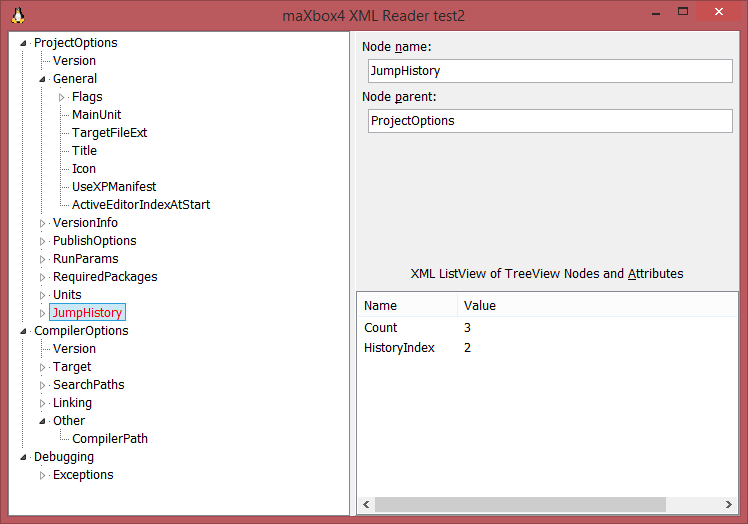
There are lot of possibilities if you’re in need to parse or write XML files:
- use TXMLDocument (the MSXML wrapper)
- or use xml components like OmniXML, NativeXml, ADOM, SAX, libxml2, DIXml, fcl-XML, Fast XMLParser, SimpleXML
Now here comes another one: VerySimpleXML – a lightweight, one-unit XML reader/writer in under 500 600 lines of code. Use it for small well-formed XML files (like configuration files, etc.).
So we use a configuration file to parse:
http://www.softwareschule.ch/examples/1045_laztest.xml
<CONFIG>
<ProjectOptions>
 <Version Value="7"/>
  <General>
   <Flags>
    <LRSInOutputDirectory Value="False"/>
   </Flags>
   <MainUnit Value="0"/>
   <TargetFileExt Value=""/>
   <Title Value="TestXMLReder"/>
   <Icon Value="0"/>
   <UseXPManifest Value="True"/>
   <ActiveEditorIndexAtStart Value="0"/>
  </General>
  <VersionInfo>
   <ProjectVersion Value=""/>
  </VersionInfo>
 <PublishOptions>
   <Version Value="2"/>
   <IgnoreBinaries Value="False"/>
   <IncludeFileFilter Value="*.
           (pas|pp|inc|lfm|lpr|lrs|lpi|lpk|sh|xml)"/>
   <ExcludeFileFilter Value="*.(bak|ppu|ppw|o|so);*~;backup"/>
 </PublishOptions>
 <RunParams>
  <local>
   <FormatVersion Value="1"/>
   <CommandLineParams Value="/home/alexs/work/fpc/demo10-
                                      xml/TestXMLReder.lpi"/>
   <LaunchingApplication PathPlusParams="/usr/X11R6/bin/xterm -T
           'Lazarus Run Output' -e $(LazarusDir)/tools/runwait.sh
           $(TargetCmdLine)"/>
  </local>
 </RunParams>
We changed class name to reflect unit naming (class is now called
TXmlVerySimple instead TVerySimpleXml) and to avoid single namespace conflict I set CL.AddClassN(CL.FindClass(‘TOBJECTlist’),’TXmlNodeListSimple’); and TXmlNodesimple to it:
procedure TXMLRederFormTreeView1Click(Sender: TObject);
var   Node:TXmlNodesimple; //TDOMNode;
      Item:TListItem;
      i:Integer;
begin
  Edit1.Text:=''; Edit2.Text:='';

  if not Assigned(TreeView1.Selected) then exit;
  Node:= TXmlNodesimple(TreeView1.Selected.Data);
  if not Assigned(Node) then Exit;

  Edit1.Text:=Node.NodeName;
  Edit2.Text:=Node.parent.nodename;
  ListView1.items.BeginUpdate;
  ListView1.Items.Clear;

  if Assigned(Node.Attributes) then
    for i:=0 to Node.Attributes.count-1 do begin
    //if node.ChildNodes.count = 0 then Exit;
       Item:=ListView1.Items.Add;
       TXMLAttribute(Node.attributes[i]).name;
       Item.Caption:= TXMLAttribute(Node.Attributes[i]).name;
       Item.SubItems.Add(TXMLAttribute(Node.Attributes[i]).Value);
       writeln(Node.text);
    end;
  ListView1.items.EndUpdate;
end;
VerySimpleXML supports just a subset of the XML specification
- load and save from stream or file
- nodes, childs and attributes
- UTF-8 and ANSI encoding
- compact output by setting Xml.Ident := ”;
- method chaining
- Parse, save and load files
procedure DoFill(AOwner:TTreeNode; Node:TXmlNodesimple {TDOMNode});
var i: integer;
    AItem:TTreeNode;
begin
  if not Assigned(Node) then exit;
  for i:= 0 to Node.ChildNodes.Count-1 do begin
     AItem:=TreeView1.Items.AddChild(AOwner,
                  TXMLNodesimple(Node.ChildNodes[i]).nodename);
     AItem.Data:= Node.ChildNodes.items[i];
     if not Assigned(TreeView1.Selected) then
       TreeView1.Selected:= AItem;
     DoFill(AItem, TXMLNodesimple(Node.ChildNodes[i]));
  end;
end;

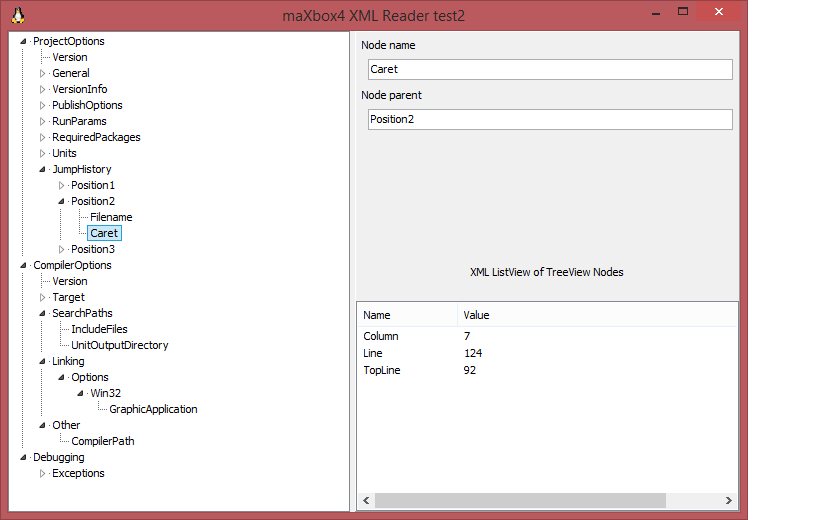
XML-Spec for “well-formed” files requires the attributes wrapped in quotation marks.
VerySimpleXML parses well even without them (if they consist of a single word).
The other non-XML-standard behavior of VerySimpleXML is the usage of the < and > tags inside an attribute or text:
XML spec requires you to write < and > but VerySimpleXML parses well if wrapped in quotation marks.
procedure TXMLRederFormParseDoc;
begin
  //TreeView1:= TTreeView.Create(self);
  TreeView1.Selected:=nil;
  TreeView1.Items.BeginUpdate;
  TreeView1.Items.Clear;
  //DoFill(nil, TDOMNode(FDoc));
  DoFill(nil, TXMLNodesimple(FDoc.root));
  TreeView1.Items.EndUpdate;
  TXMLRederFormTreeView1Click(nil);
  //Treeview1.FullExpand();
end;
Script can be found: http://www.softwareschule.ch/examples/xmldemo2.txt
And a useful blog: http://blog.spreendigital.de/2011/11/10/verysimplexml-a-lightweight-delphi-xml-reader-and-writer/
Some simple usage example:
uses Xml.VerySimple;

var
  Xml: TXmlVerySimple;
  Node, Child: TXmlNode;
begin
  Xml:= TXmlVerySimple.Create;
  Xml.LoadFromFile('example.xml');
  Xml.Root.Find('book', 'id', 'bk102').Find('author').Text := 'Dein, Carol Max';
  Node:= Xml.Root.AddChild('book');
  Child:= Node.AddChild('author');
  Child.Text:= 'Barger, Al';
  Child.Attribute['type']:= 'topseller';
  Node.AddChild('title').SetAttribute('lang','en').SetText('A big View');
  Xml.SaveToFile('output.xml');
  Xml.Free;
end;
The Xml.Root.Find() has 3 different signatures, cause in maXbox function overloading don’t works.
{ RegisterMethod(‘Function Find( Name : String) : TXmlNode;’);
RegisterMethod(‘Function Find1( Name, Attribute : String) : TXmlNode;’);
RegisterMethod(‘Function Find2( Name, Attribute, Value : String) : TXmlNode;’);
RegisterMethod(‘Function FindNodes( Name : String) : TXmlNodeList’);
}
Simple Example in a Script
First we define the XML file as a const:
const TESTCONST =
 '<?xml version="1.0" encoding="UTF-8"?>'
+'<book>                                '
+' <name>A Song of Ice and Fire</name>  '
+' <author>George R. R. Martin</author> '
+' <language>English</language>         '
+' <genre>Epic fantasy</genre>          '
+'</book>                               ';
Then we call the routine to add a child with a new book:
procedure XML_testroutine2;
var
  Xml: TXmlVerySimple;
  Node, Child: TXmlNodeSimple;
  strm: TStream;
begin
  Xml:= TXmlVerySimple.Create;
  strm:= TStringStream.Create('');
  StringtoStream(TESTCONST, strm)
  Xml.LoadFromStream(strm);
  writeln(itoa(strm.size))
  writeln(xml.text)
  Node:= Xml.Root.AddChild('bookdetail');
  Child:= Node.AddChild('author');
  Child.Text:= 'Kleiner, Al';
  Child.Attribute['type']:= 'topseller';
  Node.AddChild('title').SetAttribute('lang','en').SetText('A big View');
  Xml.SaveToFile(exepath+'examples\bookout.xml');
  Xml.Free;
  strm.Free;
  openfile(exepath+'examples\bookout.xml');
end;
Let’s take a look at the modified bookout.xml file:
<?xml version="1.0" encoding="UTF-8" ?>
<book>
  <name>A Song of Ice and Fire</name>
  <author>George R. R. Martin</author>
  <language>English</language>
  <genre>Epic fantasy</genre>
  <bookdetail>
    <author type="topseller">Kleiner, Al</author>
    <title lang="en">A big View</title>
  </bookdetail>
</book>
This is a simple XML document. You can understand the data, by just looking at the document.
https://beginnersbook.com/2018/10/xml-example/




The beta of Hirsute Hippo (to become 21.04 in April) has now been released, and is available for download. Also for Kubuntu, KDE, and Qt developers.





























 Breitschblog
The big machine guy at the end is canonically called Deus Ex Machina, literally “God out of the Machine,” a reference to the Greek theatrical practice of actually lowering the Greek gods onto stage with a crane.
LikeLike