Nearly all operating systems have a simple command to open up a file, directory, or URL from the command line. But what about to send data in a body to a URL with Http POST:
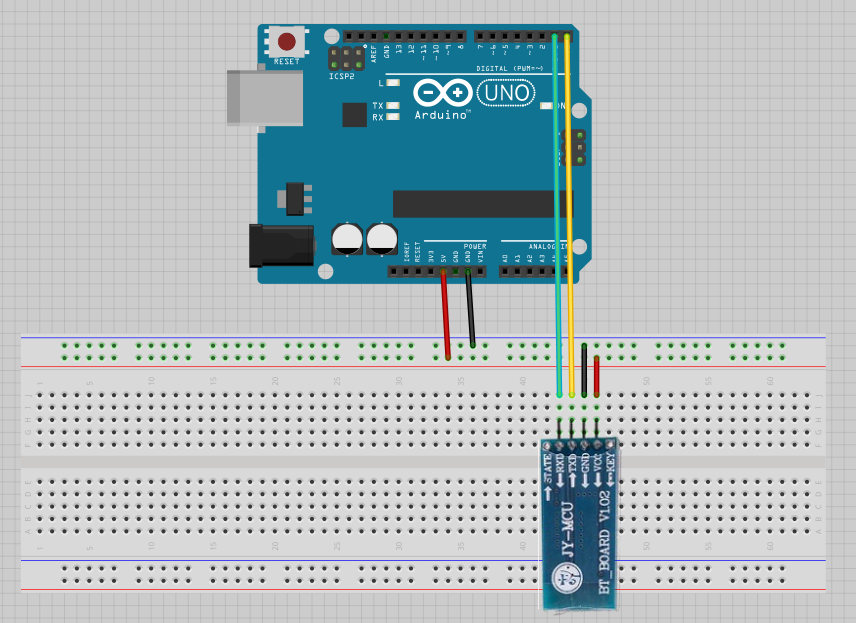
POST Schema Prototyp
A sender that generates a message containing a payload body SHOULD generate a Content-Type header field in that message unless the intended media type of the enclosed representation is unknown to the sender. If a Content-Type header field is not present, the recipient MAY either assume a media type of “application/octet-stream” ([RFC2046], Section 4.5.1) or examine the data to determine its type.
It means that the Content-Type HTTP header should be set only for PUT and POST requests.
procedure WebPostData(const UserAgent: string; const Server: string;
                                            const Resource: string; const Data: AnsiString); overload;
var
  hInet: HINTERNET;
  hHTTP: HINTERNET;
  hReq: HINTERNET;
const
  accept: packed array[0..1] of LPWSTR = (PChar('*/*'), nil);
  header: string = 'Content-Type: application/x-www-form-urlencoded';
begin
  hInet:= InternetOpen(PChar(UserAgent), INTERNET_OPEN_TYPE_PRECONFIG, nil, nil, 0);
  try
    hHTTP:= InternetConnect(hInet,PChar(Server),INTERNET_DEFAULT_HTTP_PORT, nil, nil, INTERNET_SERVICE_HTTP, 0, 1);
    try
      hReq:= HttpOpenRequest(hHTTP, PChar('POST'),
        PChar(Resource), nil, nil, @accept, 0, 1);
      try
        if not HttpSendRequest(hReq, PChar(header), length(header),
                 PChar(Data),length(Data)) then
          raise Exception.Create('HttpOpenRequest failed. ' +
          SysErrorMessage(GetLastError));
      finally
        InternetCloseHandle(hReq);
      end;
    finally
      InternetCloseHandle(hHTTP);
    end;
  finally
    InternetCloseHandle(hInet);
  end;
end;

WebPostData('My UserAgent', 'www.rejbrand.se', 'mydir/myscript.asp', Data2)
WebPostData('My UserAgent', 'www.rejbrand.se', 'mydir/myscript.asp', 'value=5)
POST is an HTTP method designed to send data to the server from an HTTP client. The HTTP POST method requests the web server accept the data enclosed in the body of the POST message. HTTP POST method is often used when submitting login or contact forms or uploading files and images to the server.
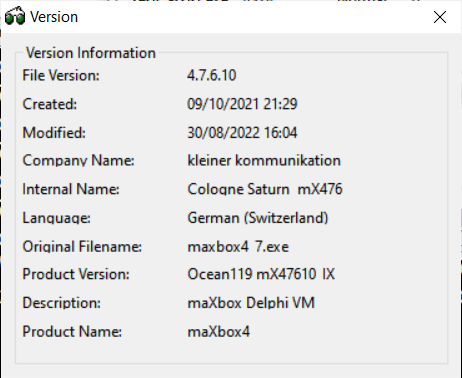
V 4.7.6.10 August 2022
INTERNET_FLAG_SECURE should be used in the flags for HttpOpenRequest, not InternetConnect.
This is explained in the MSDN documentation for WinINet API flags:
INTERNET_FLAG_SECURE
0x00800000Uses secure transaction semantics. This translates to using Secure Sockets Layer/Private Communications Technology (SSL/PCT) and is only meaningful in HTTP requests. This flag is used by HttpOpenRequest and InternetOpenUrl, but this is redundant if
https://appears in the URL. The InternetConnect function uses this flag for HTTP connections; all the request handles created under this connection will inherit this flag.

procedure WebPostData(const UserAgent: string; const Server: string;
                                       const Resource: string; const Data: AnsiString);
                                       //overload;
var
  hInet: HINTERNET;
  hHTTP: HINTERNET;
  hReq: HINTERNET;
//const
  //accept: packed array[0..1] of LPWSTR = (PChar('*/*'), nil);
  //header: string = 'Content-Type: application/x-www-form-urlencoded';
begin
  hInet:= InternetOpen(PChar(UserAgent), INTERNET_OPEN_TYPE_PRECONFIG, 'nil', 'nil', 0);
  try
    writeln('debug open: '+itoa(hinet));
    hHTTP:= InternetConnect(hInet,PChar(Server),INTERNET_DEFAULT_HTTP_PORT,
                                              'nil', 'nil', INTERNET_SERVICE_HTTP, 0, 1);
    writeln('debug connect: '+itoa(hhttp));
    try
      hReq:= HttpOpenRequest(hHTTP, ('POST'),
        //PChar(Resource), nil, nil, @accept, 0, 1);
                   PChar(Resource),'nil','nil','*/*',0,1);
      writeln('debug request: '+itoa(hreq));
      try
      //HttpSendRequest(hRequest:HINTERNET; lpszHeaders:PChar;
                    //dwHeadersLength:DWORD;lpOptional:Tobject; dwOptionalLength:DWORD):BOOL;
        if not HttpSendRequest(hReq,(header),length(header),nil {(Data)},
                                     length(Data)) then
          Xraise (Exception.Create('HttpOpenRequest failed. ' +
                                              SysErrorMessage(GetLastError)));
          writeln('debug send: '+SysErrorMessage(GetLastError));
      finally
        InternetCloseHandle(hReq);
      end;
    finally
      InternetCloseHandle(hHTTP);
    end;
  finally
    InternetCloseHandle(hInet);
  end;
end;
A pointer to a null-terminated array of strings that indicates media types accepted by the client. Here is an example.
PCTSTR rgpszAcceptTypes[] = {_T("text/*"), NULL};
Failing to properly terminate the array with a NULL pointer will cause a crash.
If this parameter is NULL, no types are accepted by the client. Servers generally interpret a lack of accept types to indicate that the client accepts only documents of type “text/*” (that is, only text documents—no pictures or other binary files).
https://docs.microsoft.com/en-us/windows/win32/api/wininet/nf-wininet-httpopenrequesta
I think I am making some progress. I changed WebPostData into a function and copied some code from elsewhere to use SSL and to return a result. It now looks like this:
function WebPostData2(const UserAgent: string; const Server: string; const Resource: string; const Data: AnsiString): String;
var
  hInet:HINTERNET;
  hHTTP:HINTERNET;
  hReq: HINTERNET;
  BufStream: TMemoryStream;
  BytesRead: Cardinal;
  aBuffer  :Array[0..4096] of Char;
  flags    :DWord;
const
  accept:packed array[0..1] of LPWSTR = (('*/*'), nil);
  header:string = 'Content-Type:text/plain';
begin
  hInet:= InternetOpen(PChar(UserAgent),INTERNET_OPEN_TYPE_PRECONFIG,nil,nil,0);
  try
    hHTTP:= InternetConnect(hInet,PChar(Server),INTERNET_DEFAULT_HTTPS_PORT,nil,nil,INTERNET_SERVICE_HTTP,0,1);
    try
      flags:= INTERNET_FLAG_SECURE or INTERNET_FLAG_KEEP_CONNECTION;
      hReq:= HttpOpenRequest(hHTTP,PChar('POST'),PChar(Resource),nil,nil,@accept,flags,1);
      try
        if not HttpSendRequest(hReq,PChar(header),length(header), PChar(Data), length(Data)) then begin
          raise Exception.Create('HttpOpenRequest failed.'+ SysErrorMessage(GetLastError));
        end else begin
           BufStream:= TMemoryStream.Create;
            try
              while InternetReadFile(hReq,@aBuffer, SizeOf(aBuffer),BytesRead) do begin
                if (BytesRead = 0) then Break;
                BufStream.Write(aBuffer, BytesRead);
              end;

              aBuffer[0]:= #0;
              BufStream.Write(aBuffer, 1);
              Result:= PChar(BufStream.Memory);
            finally
              BufStream.Free;
            end;
        end;
      finally
        InternetCloseHandle(hReq);
      end;
    finally
      InternetCloseHandle(hHTTP);
    end;
  finally
    InternetCloseHandle(hInet);
  end;
end;





































{* Extended version of JclFileUtils.BuildFileList:
function parameter Path can include multiple FileMasks as:
c:\aaa*.pas; pro*.dpr; *.d??
FileMask Seperator = ‘;’
*}
function IsEmptyDirectory(const DirPath, ExcludeFile: String): Boolean;
var List: TStringList;
begin
  List:= TStringList.Create;
  try
    BuildFileList(IncludeTrailingPathDelimiter(DirPath)+'*.*', List,faAnyFile,True,False);
    Result:= (List.Count = 0) or ((List.Count = 1) and
              (List.IndexOf(ExcludeTrailingPathDelimiter(ExcludeFile)) = 0));
  finally
    List.Free;
  end;
end;





{"lang": "it", "all_text": "DS\nPODERE CAPACCIA\n1619\nLuggo deffo apacia\nQUERCIAGRANDE\nVino da tavola della Toscana\n1993\nProdotto e imbottigliato all'origine\nPodere Capaccia\nPacini Giampaolo & C. s.a.s.\nRadda in Chianti (SI) - Italia\nItalia", "annotations": ["DS", "PODERE", "CAPACCIA", "1619", "Luggo", "deffo", "apacia", "QUERCIAGRANDE", "Vino", "da", "tavola", "della", "Toscana", "1993", "Prodotto", "e", "imbottigliato", "all'origine", "Podere", "Capaccia", "Pacini", "Giampaolo", "&", "C.", "s.a.s.", "Radda", "in", "Chianti", "(", "SI", ")", "-", "Italia", "Italia"]}
{
  "all_text": "PODERE CAPACCIA\nDS\n01\nLugo detto Capacia\nQUERCIAGRANDE\nVino da tavola della Toscana\n1993\nProdotto e imbottigliato all'origine\nPodere Capaccia\nPacini Giampaolo & C. s.a.s.\nRadda in Chianti (SI) - Italia\nItalia",
  "annotations": [
    "PODERE",
    "CAPACCIA",
    "DS",
    "01",
    "Lugo",
    "detto",
    "Capacia",
    "QUERCIAGRANDE",
    "Vino",
    "da",
    "tavola",
    "della",
    "Toscana",
    "1993",
    "Prodotto",
    "e",
    "imbottigliato",
    "all'origine",
    "Podere",
    "Capaccia",
    "Pacini",
    "Giampaolo",
    "&",
    "C.",
    "s.a.s.",
    "Radda",
    "in",
    "Chianti",
    "(",
    "SI",
    ")",
    "-",
    "Italia",
    "Italia"
  ],
  "lang": "it"
}
14/01/2022 12:56 16,832 FindReplDlg.dcu
14/01/2022 13:12 479,472 fMain.dcu
14/01/2022 12:56 35,172 gsUtils.dcu
14/01/2022 12:56 194,228 IFSI_WinForm1puzzle.dcu
14/01/2022 13:48 317,040 uPSCompiler.dcu
14/01/2022 13:27 255,155 uPSI_ComCtrls.dcu
14/01/2022 12:57 145,655 uPSI_fMain.dcu
14/01/2022 12:57 10,780 uPSI_IdPOP3.dcu
14/01/2022 12:56 5,647 uPSI_JvParsing.dcu
14/01/2022 12:56 21,122 uPSI_uTPLb_AES.dcu
14/01/2022 13:49 257,656 uPSRuntime.dcu
14/01/2022 12:56 25,467 VListView.dcu
14/01/2022 12:56 70,849 WinForm1.dcu
14/01/2022 12:56 11,519 uPSI_SynEditMiscProcs.dcu
14/01/2022 12:57 105,299 AdoMain.dcu
14/01/2022 13:12 13,521 BlocksUnit.dcu
14/01/2022 12:56 11,790 frmExportMain.dcu
14/01/2022 14:20 30,846 MathsLib.dcu
14/01/2022 12:57 37,351 neuraldatasets.dcu
14/01/2022 12:57 50,128 neuralfit.dcu
14/01/2022 12:57 316,142 neuralnetworkCAI.dcu
14/01/2022 12:57 114,820 neuralvolume.dcu
14/01/2022 13:12 6,566 PXLTiming.dcu
14/01/2022 13:12 7,431 PythonAction.dcu
14/01/2022 13:12 278,955 PythonEngine.dcu
14/01/2022 13:12 6,446 SeSHA256.dcu
14/01/2022 12:57 3,879 simplecomport.dcu
14/01/2022 12:57 11,304 U_Splines.dcu
14/01/2022 13:12 20,496 uPSI_BlocksUnit.dcu
14/01/2022 12:57 16,019 uPSI_DFFUtils.dcu
14/01/2022 12:57 24,311 uPSI_neuraldatasets.dcu
14/01/2022 14:02 153,034 uPSI_NeuralNetworkCAI.dcu
14/01/2022 10:12 59,982 uPSI_OverbyteIcsUtils.dcu
14/01/2022 13:12 8,645 uPSI_PXLTiming.dcu
14/01/2022 13:12 175,131 uPSI_PythonEngine.dcu
14/01/2022 12:57 10,108 uPSI_SynHighlighterPython.dcu
14/01/2022 10:02 41,442 uPSI_U_Splines.dcu
14/01/2022 13:12 46,240 VarPyth.dcu
14/01/2022 12:56 19,478 ViewToDoFm.dcu
14/01/2022 10:12 40,887 OverbyteIcsMimeUtils.dcu
14/01/2022 13:12 77,146 OverbyteIcsUtils.dcu
14/01/2022 13:10 26,273 SynHighlighterPython.dcu
14/01/2022 13:48 317,040 uPSCompiler.dcu
14/01/2022 13:49 257,656 uPSRuntime.dcu
14/01/2022 17:46 317,056 uPSCompiler.dcu
14/01/2022 17:47 257,646 uPSRuntime.dcu
Python REST API Example
Now that the requests module is installed let’s again open up a text editor and enter the following code:
import requests

url = "https://api.apilayer.com/image_to_text/url?url=http%3A%2F%2Fwww.kleiner.ch%2Fkleiner%2Fimages%2Fuml_buch.jpg"

payload = {}
headers= {
  "apikey": "DNwCF9Rf6y1AmSSednjn8Zh.............."
}

response = requests.request("GET", url, headers=headers, data = payload)

status_code = response.status_code
result = response.text
| 12345678910111213 | importrequestsurl ="https://api.apilayer.com/image_to_text/url?url=http%3A%2F%2Fwww.kleiner.ch%2Fkleiner%2Fimages%2Fuml_buch.jpg"payload ={}headers={ "apikey": "DNwCF9Rf6y1AmSSednjn8Zh.............."}response =requests.request("GET", url, headers=headers, data =payload)status_code =response.status_coderesult =response.text |
Image to Text API uses a neural net (LSTM) based OCR engine which is focused on line recognition, but also supports recognizing the character patterns. It supports both handwriting and printed materials.
https://apilayer.com/marketplace/image_to_text-api?live_demo=show
Now the same code for Python4maXbox:
procedure PyAPICode(imgpath: string);
begin
  with TPythonEngine.Create(Nil) do begin
  pythonhome:= 'C:\Users\max\AppData\Local\Programs\Python\Python36-32\';
  try
    loadDLL;
    ExecString('import requests, json');
    ExecStr('url= "https://api.apilayer.com/image_to_text/url?url='+imgpath+'"');
    ExecStr('payload = {}');
    ExecStr('headers= {"cache-control":"no-cache",'+
                      '"apikey":"DNwCF9Rf6y1AmSSednjn8Zh........."}');
    Println(EvalStr('requests.request("GET",url,headers=headers,data=payload).text'));
  except
    raiseError;
  finally
    free;
  end;
 end;
end;
| 12345678910111213141516171819 | procedurePyAPICode(imgpath: string);begin withTPythonEngine.Create(Nil) dobegin pythonhome:= 'C:\Users\max\AppData\Local\Programs\Python\Python36-32\'; try loadDLL; ExecString('import requests, json'); ExecStr('url= "https://api.apilayer.com/image_to_text/url?url='+imgpath+'"'); ExecStr('payload = {}'); ExecStr('headers= {"cache-control":"no-cache",'+ '"apikey":"DNwCF9Rf6y1AmSSednjn8Zh........."}'); Println(EvalStr('requests.request("GET",url,headers=headers,data=payload).text')); except raiseError; finally free; end; end;end; |
The API will also work for handwritings. Even for non-English texts. The output is JSON data with all the text extracted and even the language is auto detected,

http://www.kleiner.ch/kleiner/images/uml_buch.jpg
{
  "all_text": "ih \u00bb Der Entwickler\nFachwissen f\u00fcr Programmierer\nMax Kleiner\nUML\nmit Delphi\nObjektorientiert modellieren\nund entwickeln\nSoftware & Support",
  "annotations": [
    "ih",
    "\u00bb",
    "Der",
    "Entwickler",
    "Fachwissen",
    "f\u00fcr",
    "Programmierer",
    "Max",
    "Kleiner",
    "UML",
    "mit",
    "Delphi",
    "Objektorientiert",
    "modellieren",
    "und",
    "entwickeln",
    "Software",
    "&",
    "Support"
  ],
  "lang": "de"
}
| 1234567891011121314151617181920212223242526 | http://www.kleiner.ch/kleiner/images/uml_buch.jpg{ "all_text": "ih \u00bb Der Entwickler\nFachwissen f\u00fcr Programmierer\nMax Kleiner\nUML\nmit Delphi\nObjektorientiert modellieren\nund entwickeln\nSoftware & Support", "annotations": [ "ih", "\u00bb", "Der", "Entwickler", "Fachwissen", "f\u00fcr", "Programmierer", "Max", "Kleiner", "UML", "mit", "Delphi", "Objektorientiert", "modellieren", "und", "entwickeln", "Software", "&", "Support" ], "lang": "de"} |
Also a compiled snippet from a WinInet class is available.
function Image_to_text_API2(AURL, url_imgpath, aApikey: string): string;
var httpq: THttpConnectionWinInet; rets: TStringStream;
    heads: TStrings; iht: IHttpConnection2; //losthost:THTTPConnectionLostEvent;
begin
  httpq:= THttpConnectionWinInet.Create(true);
  rets:= TStringStream.create('');
  heads:= TStringlist.create;
  try
    heads.add('apikey='+aAPIkey);
    iht:= httpq.setHeaders(heads);
    httpq.Get(Format(AURL,[url_imgpath]), rets);
    if httpq.getresponsecode=200 Then result:= rets.datastring
      else result:='Failed:'+
             itoa(Httpq.getresponsecode)+Httpq.GetResponseHeader('message');
  except
    writeln('EWI_HTTP: '+ExceptiontoString(exceptiontype,exceptionparam));
  finally
    httpq:= Nil;
    heads.Free;
    rets.Free;
  end;
end;
| 12345678910111213141516171819202122 | functionImage_to_text_API2(AURL, url_imgpath, aApikey: string): string;varhttpq: THttpConnectionWinInet; rets: TStringStream; heads: TStrings; iht: IHttpConnection2; //losthost:THTTPConnectionLostEvent;begin httpq:= THttpConnectionWinInet.Create(true); rets:= TStringStream.create(''); heads:= TStringlist.create; try heads.add('apikey='+aAPIkey); iht:= httpq.setHeaders(heads); httpq.Get(Format(AURL,[url_imgpath]), rets); ifhttpq.getresponsecode=200Thenresult:= rets.datastring elseresult:='Failed:'+ itoa(Httpq.getresponsecode)+Httpq.GetResponseHeader('message'); except writeln('EWI_HTTP: '+ExceptiontoString(exceptiontype,exceptionparam)); finally httpq:= Nil; heads.Free; rets.Free; end; end; |
Proxies can be configured too: Pointer to a null-terminated string that specifies the name of the proxy server(s) to use when proxy access is specified by setting dwAccessType to INTERNET_OPEN_TYPE_PROXY. Do not use an empty string, because InternetOpen will use it as the proxy name. The WinINet functions recognize only CERN type proxies (HTTP only) and the TIS FTP gateway (FTP only). If Microsoft Internet Explorer is installed, these functions also support SOCKS proxies. FTP requests can be made through a CERN type proxy either by changing them to an HTTP request or by using InternetOpenUrl. If dwAccessType is not set to INTERNET_OPEN_TYPE_PROXY, this parameter is ignored and should be NULL. For more information about listing proxy servers, see the Listing Proxy Servers section of Enabling Internet Functionality.
Python Post multipart/form-data
When you make a POST request, you have to encode the data that forms the body of the request in some way. When you are writing client-side code:
- use
multipart/form-datawhen your form includes any<input type="file">elements - otherwise you can use
multipart/form-dataorapplication/x-www-form-urlencodedbutapplication/x-www-form-urlencodedwill be more efficient. application/x-www-form-urlencodedis more or less the same as a query string on the end of the URL.
procedure PyCode2Post(imgpath, apikey: string);
begin
  with TPythonEngine.Create(Nil) do begin
  pythonhome:= 'C:\Users\max\AppData\Local\Programs\Python\Python36-32\';
  try
    loadDLL;
    ExecString('import requests');
    ExecStr('api_url= "https://api.api-ninjas.com/v1/imagetotext"');
    ExecStr('image_file_descriptor = open(r"'+imgpath+'", "rb")');
    ExecStr('files = {"image": image_file_descriptor}');
    ExecStr('headers={"X-Api-Key":"'+apikey+'"}');
    Println(EvalStr('requests.post(api_url,headers=headers,files=files).text'));
  except
    raiseError;
  finally
    unloadDLL;
    free;
  end;
 end;
end;




function postRequest(const AUrl,AData:AnsiString; blnSSL:Boolean = True): AnsiString;
var
  aBuffer     : Array[0..4096] of Char;
  Header      : TStringStream;
  BufStream   : TMemoryStream;
  sMethod     : AnsiString;
  BytesRead   : Cardinal;
  pSession    : HINTERNET;
  pConnection : HINTERNET;
  pRequest    : HINTERNET;
  parsedURL   : TStringArray;
  port,hostport: Integer;
  flags       : DWord;
  HostName,FileName,sHeader:String;
//begin
  procedure ParseURL(URL:string;var HostName,FileName:string;var HostPort:Integer);
  var
    i,p,k: DWORD;
    function StrToIntDef(const S:string; Default:Integer):Integer;
    var
      E: Integer;
    begin
      Val(S, Result, E);
      if E <> 0 then Result := Default;
    end;
  begin
    if lstrcmpi('http://',PChar(Copy(URL,1,7))) = 0 then System.Delete(URL, 1, 7);
    HostName := URL;
    FileName := '/';
    HostPort := INTERNET_DEFAULT_HTTP_PORT;
    i := Pos('/', URL);
    if i <> 0 then begin
      HostName:= Copy(URL, 1, i-1);
      FileName:= Copy(URL, i, Length(URL) - i + 1);
    end;
    p:=pos(':',HostName);
    if p <> 0 then begin
      k:=Length(HostName)-p;
      HostPort:=StrToIntDef(Copy(HostName,p+1,k),INTERNET_DEFAULT_HTTP_PORT);
      Delete(HostName,p,k+1);
    end;
  end;
  begin
  //ParsedUrl :=
  ParseUrl(AUrl, hostname, filename, hostport);
  port:= hostport;
  Result := '';
  pSession:= InternetOpen(nil,INTERNET_OPEN_TYPE_PRECONFIG,nil, nil,0);

  if Assigned(pSession) then
  try
    if blnSSL then
      Port:= INTERNET_DEFAULT_HTTPS_PORT
    else
      Port:= INTERNET_DEFAULT_HTTP_PORT;
    //pConnection:= InternetConnect(pSession,PChar(ParsedUrl[0]), port,nil,nil,INTERNET_SERVICE_HTTP,0,0);
    pConnection:= InternetConnect(pSession,PChar(hostname),port, nil,nil,INTERNET_SERVICE_HTTP,0,0);

    if Assigned(pConnection) then
    try
      if (AData = '') then
        sMethod:= 'GET'
      else
        sMethod:= 'POST';

      if blnSSL then
        flags := INTERNET_FLAG_SECURE or INTERNET_FLAG_KEEP_CONNECTION
      else
        flags := INTERNET_SERVICE_HTTP;

      pRequest:= HTTPOpenRequest(pConnection,PChar(sMethod), PChar(filename),nil,nil,nil,flags,0);

      {hRequest:= HttpOpenRequest(hConnection,  //  Function original, see http://msdn.microsoft.com/zh-cn/library/aa917871
                                  PChar(RequestMethod),
                                  PChar(FileName),
                                  HTTP_VERSION,
                                  '', //Referrer
                                  nil,//ACCEPTTYPES Accepted file type text / html * / *
                                  INTERNET_FLAG_NO_CACHE_WRITE or
                                  INTERNET_FLAG_RELOAD,
                                  0       }

      if Assigned(pRequest) then
      try
        Header:= TStringStream.Create('');
        try
          with Header do begin
            //WriteString('Host: ' + ParsedUrl[0] + sLineBreak);
            WriteString('Host: ' + hostname + sLineBreak);
            WriteString('User-Agent: Custom program 1.0'+SLineBreak);
            WriteString('Accept: text/html,application/xhtml+xml,application/xml;q=0.9,*/*;q=0.8'+SLineBreak);
            WriteString('Accept-Language: en-us,en;q=0.5' + SLineBreak);
            WriteString('Accept-Charset: ISO-8859-1,utf-8;q=0.7,*;q=0.7'+SLineBreak);
            WriteString('Keep-Alive: 300'+ SLineBreak);
            WriteString('Connection: keep-alive'+ SlineBreak);
            WriteString('Content-Type: application/x-www-form-urlencoded'+ SlineBreak+SLineBreak);
            //sHeader := 'Content-Type: application/x-www-form-urlencoded' + #13#10;
          end;

          HttpAddRequestHeaders(pRequest,PChar(Header.DataString), Length(Header.DataString),HTTP_ADDREQ_FLAG_ADD);

          if HTTPSendRequest(pRequest,nil,0,Pointer(AData), Length(AData)) then begin
            BufStream:= TMemoryStream.Create;
            try
              while InternetReadFile(pRequest,@aBuffer, SizeOf(aBuffer),BytesRead) do begin
                if (BytesRead = 0) then Break;
                BufStream.Write(aBuffer,BytesRead);
              end;

              aBuffer[0]:= #0;
              BufStream.Write(aBuffer, 1);
              Result:= PChar(BufStream.Memory);
            finally
              BufStream.Free;
            end;
          end;
        finally
          Header.Free;
        end;
      finally
        InternetCloseHandle(pRequest);
      end;
    finally
      InternetCloseHandle(pConnection);
    end;
  finally
    InternetCloseHandle(pSession);
  end;
end;
The first “killer app” was VisiCalc for the Apple II. Businessmen and accountants ran out and bought Apple IIs in droves because all of a sudden there was a software spreadsheet that calculated ledgers instantly, a task accountants normally spent days doing.

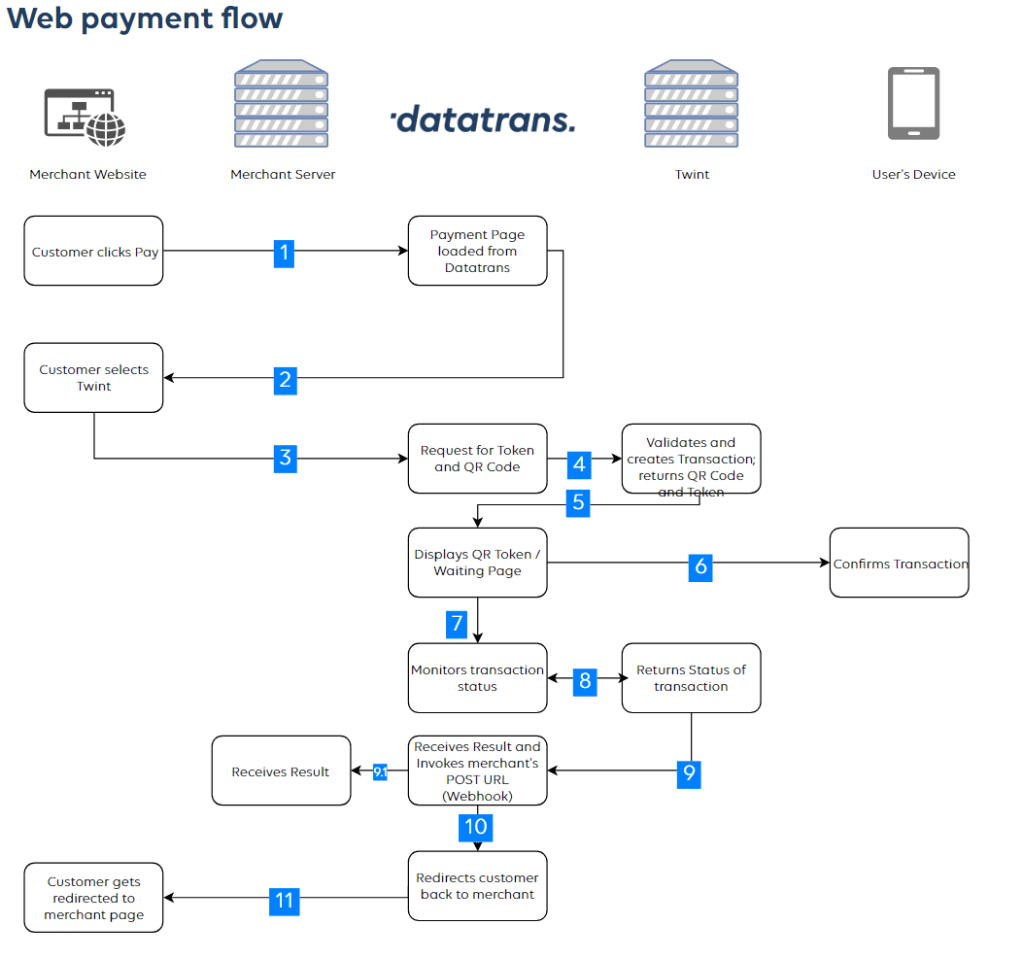
With the TWINT app, you can make payments easily and conveniently: in online shops, at supermarket cash registers, in canteens, and at vending machines. With TWINT, you can transfer money in real-time – easily from smartphone to smartphone. And you can also request and receive money from friends and family.
 Breitschblog

After spending a good bit of time today trying to wrap my brain around the (significant but powerful) paradigm shift between old ways of processing web form data and how it is done with WebAPI, I thought I’d add my 2 cents to this discussion.
What I wanted to do (which is pretty common for web form processing of a POST) is to be able to grab any of the form values I want, in any order. Say like you can do if you have your data in a System.Collections.Specialized.NameValueCollection. But turns out, in WebAPI, the data from a POST comes back at you as a stream. So you can’t directly do that.
LikeLike